Logging into the Raja Luck is the first step toward accessing your games, rewards, wallet balance, and daily activities.
Whether you’re a new user setting up your account for the first time or someone returning for regular gameplay, a smooth login experience ensures you never miss a bonus, offer, or winning opportunity.
Raja Luck is designed with a secure, user-friendly login system that works across all modern smartphones, keeping your account protected while giving you quick access anytime.
This guide walks you through everything, step-by-step login instructions, common issues, fixes, and a complete password reset process.
Direct Raja Luck Login Access
Simply click the login button below to redirect official Raja Luck login page:
Another way is, go to the Raja Luck website or app and click on the account tab in the bottom menu. This will redirect you to the login page as you’ve not logged in till now.
If you don’t have the app installed yet, follow How to download & install Raja Luck app to access the official login safely.
Overview – Why Logging In Correctly Matters
Raja Luck uses a secure login system to ensure that:
- Your account remains protected
- Your wallet funds stay safe
- Only you can access your gaming history and transactions
- Your profile stays synchronized across devices
A correct login process prevents errors like “Unauthorized Access,” “Session Expired,” or “Account Not Found.”
Step-By-Step Raja Luck Login Guide
Let’s break down the login process in a simple way so even first-time users never get stuck.
Step 1: Open the Official Raja Luck Login Page
You can use the Login Now button above or open the official site or app and go to the login page manually by clicking on the account tab.
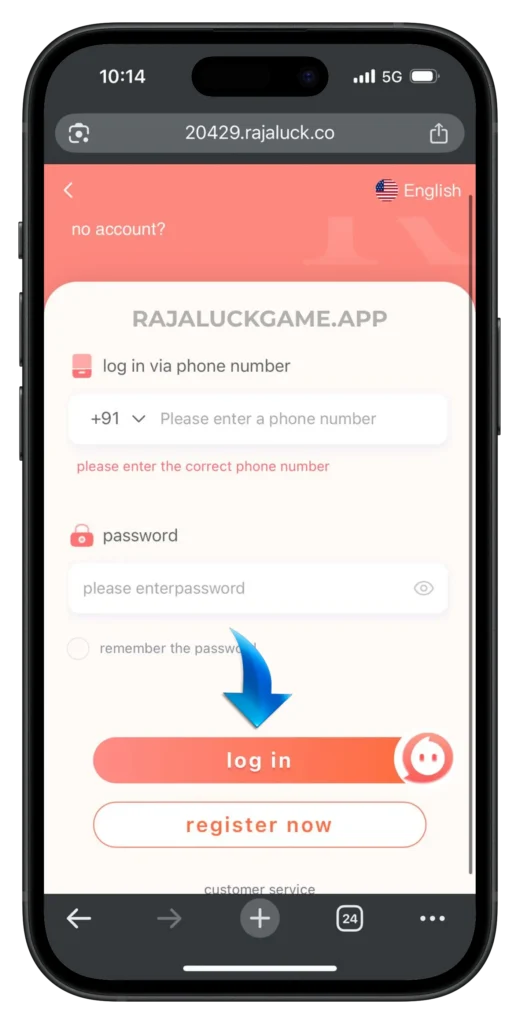
Here you’ll see a clean page asking for:
- Mobile Number
- Login Password
- Login Button
Make sure you are on the official page to avoid phishing risks.
Step 2: Enter Your Registered Mobile Number
Type the same number you used during registration. Important points:
- No country code needed (enter only 10 digits)
- Avoid using someone else’s number
- Do not use a new number, your old one remains linked to your account
Step 3: Enter Your Login Password
Use the password you created during registration. It must match exactly, including any uppercase/lowercase letters.
If you forgot the password, don’t worry, the reset steps are explained later in this article.
Step 4: Tap the “Login” Button
Once both fields are correct, tap Login. You’ll be redirected straight to your main dashboard.
Step 5: Access Your Account Features
Once logged in and funded, learn how to withdraw from Raja Luck safely and understand payout timelines.
After successful login, you can:
- Play games
- View your wallet balance
- Make deposits or withdrawals
- Claim bonuses
- Track results
- Update settings
After logging in, you can also explore the Raja Luck referral program to earn rewards by inviting others.
Once logged in, improve your gameplay by following these practical Raja Luck game tips and tricks to manage risk and play smarter.
Your session stays active unless you manually log out.
Common Login Issues & Solutions
Even with a simple login system, some users face minor problems. Here are the most frequent issues and how to fix them instantly.
Issue 1: Wrong Password Error
Reason: Mistyped password or forgotten credentials.
Solution:
- Re-enter carefully
- Check caps lock
- Use the “Forgot Password” feature (explained below)
Issue 2: Mobile Number Not Registered
Reason: User entered a number that wasn’t used during signup.
Solution:
- Enter the correct mobile number
- If unsure, check old SMS or registration confirmation
Issue 3: Page Not Opening
Possible Causes:
- Weak internet
- Browser glitch
- Cache overload
Solutions:
- Refresh the page
- Switch to Chrome
- Clear browser cache
- Restart mobile data
Issue 4: “Too Many Attempts” Alert
Reason: Multiple failed login attempts for security reasons.
Solution:
- Wait 5 minutes
- Try again with the correct credentials
- Reset password if needed
Issue 5: OTP Required But Not Received
(Some devices may ask for OTP during suspicious login activity.)
Solution:
- Check signal
- Disable airplane mode
- Tap “Resend OTP”
- Restart phone
If login issues continue after multiple attempts, you should contact Raja Luck customer support for manual assistance.
For device, OTP, app, or server-related problems beyond login, refer to Raja Luck issues list with solution for detailed fixes.
How to Reset Your Raja Luck Password (If Forgotten)
If you’ve forgotten your password, don’t panic. You can reset it easily in under 1 minute.
Step 1: Go to the Login Page
Tap Forgot Password under the login button.
Step 2: Enter Your Registered Mobile Number
Ensure this is the same number linked to your account.
Step 3: Tap “Get OTP”
A 6-digit code will arrive via SMS.
If not received:
- Wait 30 seconds
- Tap Resend OTP
- Ensure the network is stable
Step 4: Verify the OTP
Enter the code exactly as received.
Step 5: Set a New Password
Create a strong but easy-to-remember password.
Examples of strong passwords:
- Raja@1264
- LuckGame$2026
Step 6: Save & Login
You can now log in with your new password instantly.
Login Safety Tips (Highly Recommended)
To keep your account safe:
- Never share your password
- Avoid logging in through unknown links
- Use your own device only
- Keep your mobile number active
- Enable device lock for extra security
These steps keep your wallet and gaming history protected.
Basic login safety practices like password protection and device security are also recommended by Google.
Final Words
To understand real login stability, payouts, and gameplay flow, read my 30-day experience with Raja Luck based on hands-on usage.
The Raja Luck login process is designed to be smooth, secure, and beginner-friendly.
Whether you’re logging in for the first time or returning for daily gameplay, following the steps in this guide ensures a trouble-free experience.
If you’re ready to access your account now, click below: